> For the complete documentation index, see [llms.txt](https://ask.birdie.ai/llms.txt). Markdown versions of documentation pages are available by appending `.md` to page URLs; this page is available as [Markdown](https://ask.birdie.ai/integrations-and-data-ingestion/how-to-integrate-with/buzzmonitor.md).
# BuzzMonitor
### Overview
Birdie's BuzzMonitor integration enables users to import social interactions (posts, comments and DMs) straight from the BuzzMonitor API. Below are the key steps to setting up the integration so Birdie can pull data from your environment.
### Requirements
* **BuzzMonitor User**: The user e-mail address tied with the BuzzMonitor platform. (called `bm_user`)
* **BuzzMonitor Access Token**: A random and unique key generated by BuzzMonitor that authenticates and allows communication between the platform and external systems.
* **Filter Payload (JSON)**: The platform sources are included in the payload as `report_sources` and are used to filter specific platforms and pages, defining which platform(s) the connector will request data from and which page(s) the data is linked to.
{% hint style="warning" %}
For Birdie to be able to access the **BuzzMonitor API**, you'll need to contact the BuzzMonitor team and request that developer mode be activated on your account.
{% endhint %}
To retrieve your access token and collection filters, follow the instructions below.
### Setup in BuzzMonitor
{% stepper %}
{% step %}
#### Access the Developer Page
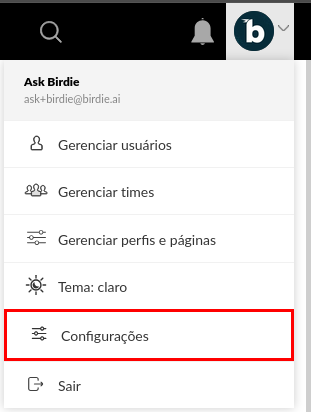
* Go to the [settings page](https://app.buzzmonitor.com.br/user/settings):
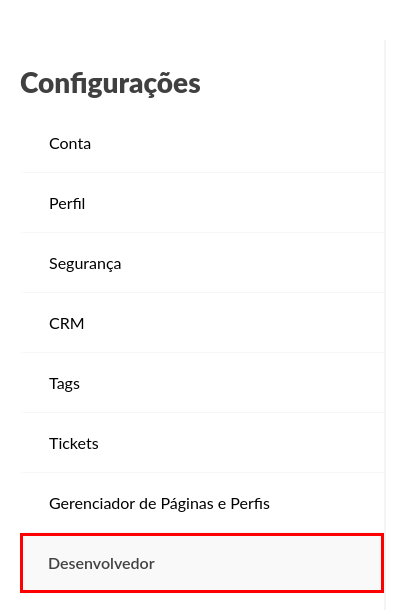
* Check if you can find the **Developer tab**:
{% endstep %}
{% step %}
#### Generate an Access Token
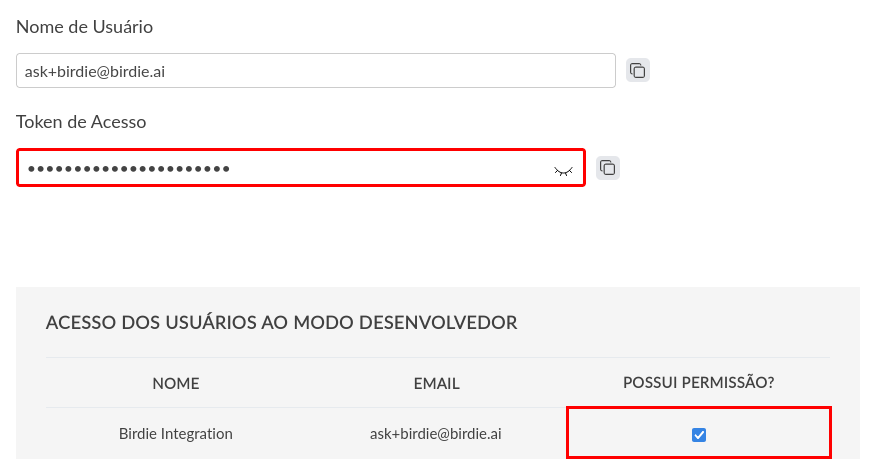
* Validate if the **Developer Mode** is enabled for your account before generating a new access token.
* Copy your existing token or generate a new one.
{% endstep %}
{% step %}
#### Select the Collection
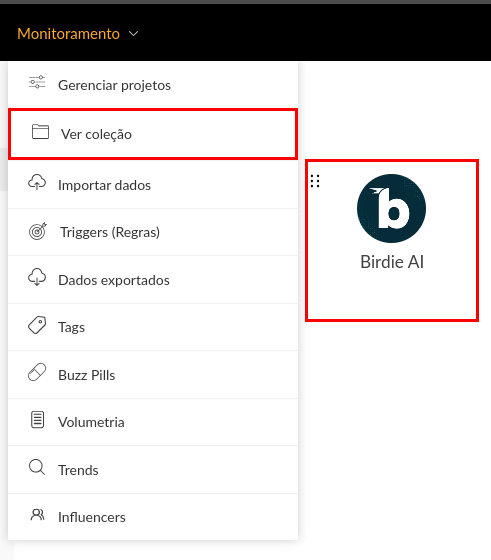
* Now you'll need to select your desired collection.
{% endstep %}
{% step %}
#### Export Collection Filters
* The filter payload will contain all required fields that Birdie will use to configure the integration.
* The payload is in JSON format and should look something like this:
{% code title="buzzmonitor\_payload.json" %}
```json
{
"authentication_params": {
"bm_user": "...",
"api_key": "..."
},
"general_params": {
"timezone": "-3.0",
"until": "20250821595959",
"since": "20250821000000",
"services": [
"facebook",
"instagram"
]
},
"report_sources": {
"facebook_pages_wall": [
{
"name": "...",
"user": "...",
"other_pages": false,
"page_id": "...",
"source": "..."
}
],
"instagram": [
{
"name": "...",
"user": "...",
"bm_user": "..."
}
]
}
}
```
{% endcode %}
{% hint style="warning" %}
The payload may contain more information; this example contains the minimum required fields to work with the BuzzMonitor API.
{% endhint %}
{% endstep %}
{% step %}
#### Share the Access Token and Payload securely
Save both access token and filter payload securely, this will be used to authenticate API and filter requests.
Share them with the Birdie team [using a secure way](/integrations-and-data-ingestion/securely-sharing-credentials-for-data-integration.md)
{% endstep %}
{% endstepper %}
### Connect to Birdie
Through this integration, you can import social media (posts and comments) and conversations (direct messages/inbox).
For each interaction, we extract the main fields for that interaction, such as Channel, Status, Priority, Tags, Author Name, Text, etc.
### Data in scope
#### Sources
The connector currently supports:
* `facebook_private_messages` (DMs)
* `facebook_page_wall` (Posts and Comments)
* `instagram` (DMs, posts and comments)
* `linkedin_updates` (Posts, comments and mentions)
#### Source fields
Each source requires different fields. The only common field is `name`, which is required for all types of source.
* facebook (page\_wall and private\_messages)
* `name`
* `user`
* `page_id`
* `other_pages`
* instagram
* `name`
* `user`
* `bm_user`
* linkedin
* `name`
#### Interaction types
The BuzzMonitor platform supports these interaction types:
* Public interactions:
* `post`
* `comment`
* `comment_reply`
* `reply`
* `mention`
* `comment_from_mention`
* `reels`
* `ad` (Promoted posts)
* `carousel_album` (Instagram carousel)
* Private interactions (DMs):
* `direct_message`
* `message`
#### Custom fields
The integration will retrieve additional fields from the BuzzMonitor API, these fields can be mapped directly into Birdie, preserving your unique data structure.
Once imported, BuzzMonitor fields appear as Birdie custom fields, maintaining consistency across all platforms and enabling enhanced segmentation, filtering, and custom workflows in Birdie.
---
# Agent Instructions
This documentation is published with GitBook. GitBook is the documentation platform designed so that both humans and AI agents can read, navigate, and reason over technical content effectively. Learn more at gitbook.com.
## Querying This Documentation
If you need additional information that is not directly available in this page, you can query the documentation by asking a question.
Perform an HTTP GET request on the following URL with the `ask` and `goal` query parameters:
```
GET https://ask.birdie.ai/integrations-and-data-ingestion/how-to-integrate-with/buzzmonitor.md?ask=&goal=
```
`ask` is the immediate question: it should be specific, self-contained, and written in natural language.
`goal` is what the user is ultimately trying to achieve, the reason they need the answer. Sharing it helps GitBook give you a better, more relevant answer. A goal is most helpful when it describes the outcome the user wants rather than restating the question. For example, with `ask=how do I create an API token`, a goal like `automate deployments from our CI pipeline` lets GitBook tailor the answer to that use case.
The response will contain a direct answer to the question and relevant excerpts and sources from the documentation.
Use this mechanism when the answer is not explicitly present in the current page, you need clarification or additional context, or you want to retrieve related documentation sections.