For the complete documentation index, see llms.txt. This page is also available as Markdown.

Kustomer

Overview

This integration imports conversations from your Kustomer account into Birdie so that you can analyze support and messaging interactions alongside other feedback sources.

Below are key details about what we need to set up the integration and how conversations and data are imported.

Requirements

For Birdie to authenticate with the Kustomer API and import data, you'll need to generate an API Key (an auto-generated token), used to authenticate API requests. Provide the Birdie team with the following:

  • Subdomain of your Kustomer account (e.g.: subdomain.kustomerapp.com)

  • API Key (with read permissions)

If identification of agents and customers is necessary, Birdie can request additional permissions, see all permissions below.

API Key Permissions

Role
Status
Description

org.permission.conversation.read

Required

View conversations

org.permission.message.read

Required

View messages

org.permission.tag.read

Required

View tags

org.permission.metadata.read

Required

View records metadata (custom fields / KObjects)

org.permission.search.create org.permission.search.update org.permission.search_global.create org.permission.search_preview.create

Required

Search records

org.permission.customer.read

Required

View customers

org.permission.team.read org.permission.user.read org.permission.routing.read

Required

View users (agents), teams and queues

org.permission.note.read

Optional*

View conversation internal notes

org.permission.satisfaction.read

Optional*

View conversation satisfaction

org.permission.brand.read

Optional*

View brands from organization

org.permission.company.read

Optional*

View companies metadata

*: See how these permissions improve segmentation across brands, companies, and conversations in Additional records for enhanced segmentation.

Setup in the third‑party tool

1

Accessing your Kustomer account

  • Log in to your Kustomer account and go to Settings.

  • Select Security.

  • Click API Keys.

2

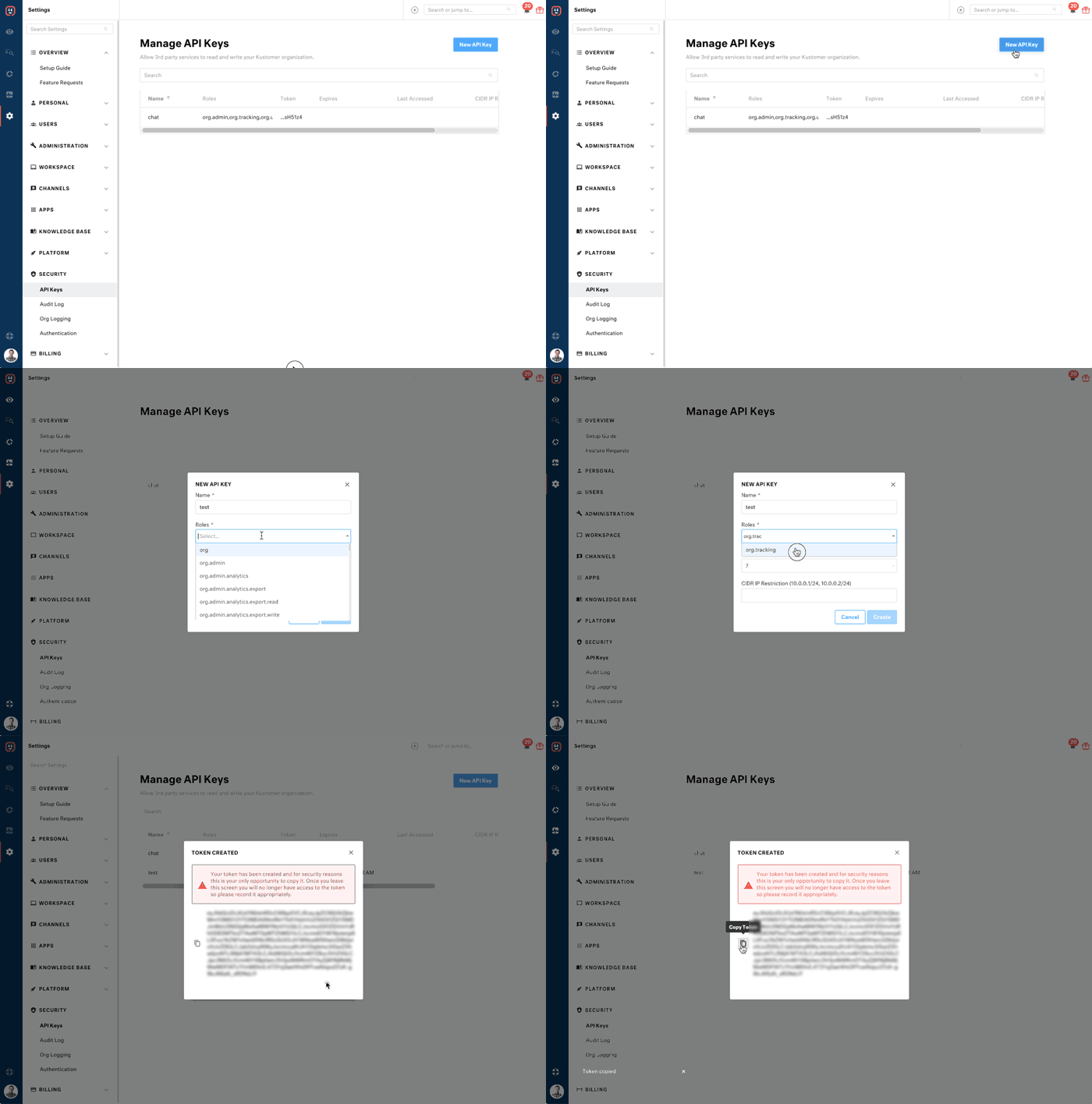
Generate an API Key

  • Enter a descriptive Name for your API key (e.g.: Birdie Integration).

  • Set Expires (in days) to "No Expiration".

  • Set Roles permissions, this field specifies what access will the generated key have.

  • Leave CIDR IP Restriction empty or for additional security, we recommend setting the restriction to allow only Birdie's infrastructure to use this key. Contact the Birdie team to obtain the IP ranges to whitelist.

  • Click Create.

  • Copy and save the generated API Key. It will only be shown once.

Delete an API Key

If you suspect a token has been compromised, delete it immediately. Deleting a token will deactivate it permanently.

When using API keys, keep the following in mind:

  • API keys cannot be edited, only deleted.

  • A deleted token cannot be used to make requests to and from Kustomer.

  • When selecting roles, be mindful of what permissions are necessary for this token. For example, if a service only requires READ access, you can create a token with just org.permission.<service>.read.

  • Provide a helpful naming to your API Key since your team may use dozens of tokens along the way.

Connect to Birdie

Once you have generated an API Key, share securely with the Birdie team:

  • Kustomer subdomain

  • API Key

The Birdie team will configure the connector and confirm once the integration is active.

Data in scope

Additional records for enhanced segmentation

Birdie supports importing additional records associated with conversations to improve segmentation, such as: customers, teams, users (agents), internal notes, and satisfaction ratings.

  • The team and user permissions can provide more context for conversations, including which team was responsible.

  • The satisfaction permission allows the ingestion of CSAT (Customer Satisfaction) data, enabling its use for customer experience analysis, and performance reporting across teams and agents.

  • The note permission allows the ingestion of internal notes added by agents to conversations, providing additional internal context that can help enrich conversation analysis by capturing observations, troubleshooting details, or internal communication.

  • The brand permission allows the ingestion of brand data, making it available for analysis and reporting. This helps segment conversations and performance by brand, providing clearer visibility into how different brands are performing across teams and agents.

  • The company permission allows the ingestion of company data, providing additional context about the organizations associated with conversations. This can help enrich analysis and reporting by linking interactions to specific companies and supporting a more complete view of customer relationships.

Before setting up the integration, some permissions need to be enabled depending on your integration requirements.

Custom fields

If your Kustomer setup includes custom fields (KObjects), these fields can be mapped directly into Birdie, preserving your unique data structure. Kustomer custom fields support a variety of data types and allow you to store additional data within conversations beyond standard fields (see Kustomer's KObjects documentation: Data model overview).

Once imported, Kustomer custom fields appear as Birdie custom fields, maintaining consistency across all platforms and enabling enhanced segmentation, filtering, and custom workflows in Birdie.

References

Last updated
