> For the complete documentation index, see [llms.txt](https://ask.birdie.ai/llms.txt). Markdown versions of documentation pages are available by appending `.md` to page URLs; this page is available as [Markdown](https://ask.birdie.ai/core-concepts-and-entities/segments.md).
# Segments
{% tabs %}
{% tab title="What is Segmentation in Birdie?" %}
Segmentation is an advanced feature in Birdie AI that allows you to categorize your customers into different groups or "segments" based on specific profile characteristics or behaviors. This functionality adds a powerful layer of context to feedback analysis, helping you understand not only "what" customers are saying but also "who" is saying it.
With Segmentation, you can:
* Identify the customer groups most impacted by critical issues.
* Track feedback trends within a specific segment over time.
* Prioritize segments for action based on impact and relevance.
* Compare metrics across different segments to understand which groups are better or worse served.

This feature is designed to help CX, Product, and Marketing teams prioritize initiatives that directly impact user experience and drive meaningful results, such as:
* Reducing support contact rate.
* Increasing satisfaction and NPS.
* Lowering churn.
## Types of Analysis Possible with Segmentation
Segmentation enables a much more targeted analysis, allowing you to:
* Identify critical issues by segment: Discover which problems are most recurrent within a specific segment.
* Measure impact by group: Determine the impact of issues or opportunities on specific customer segments.
* Track trends and comparisons: Evaluate how satisfaction metrics, NPS, or other KPIs change over time for different segments and compare results between them.

### Visualization examples
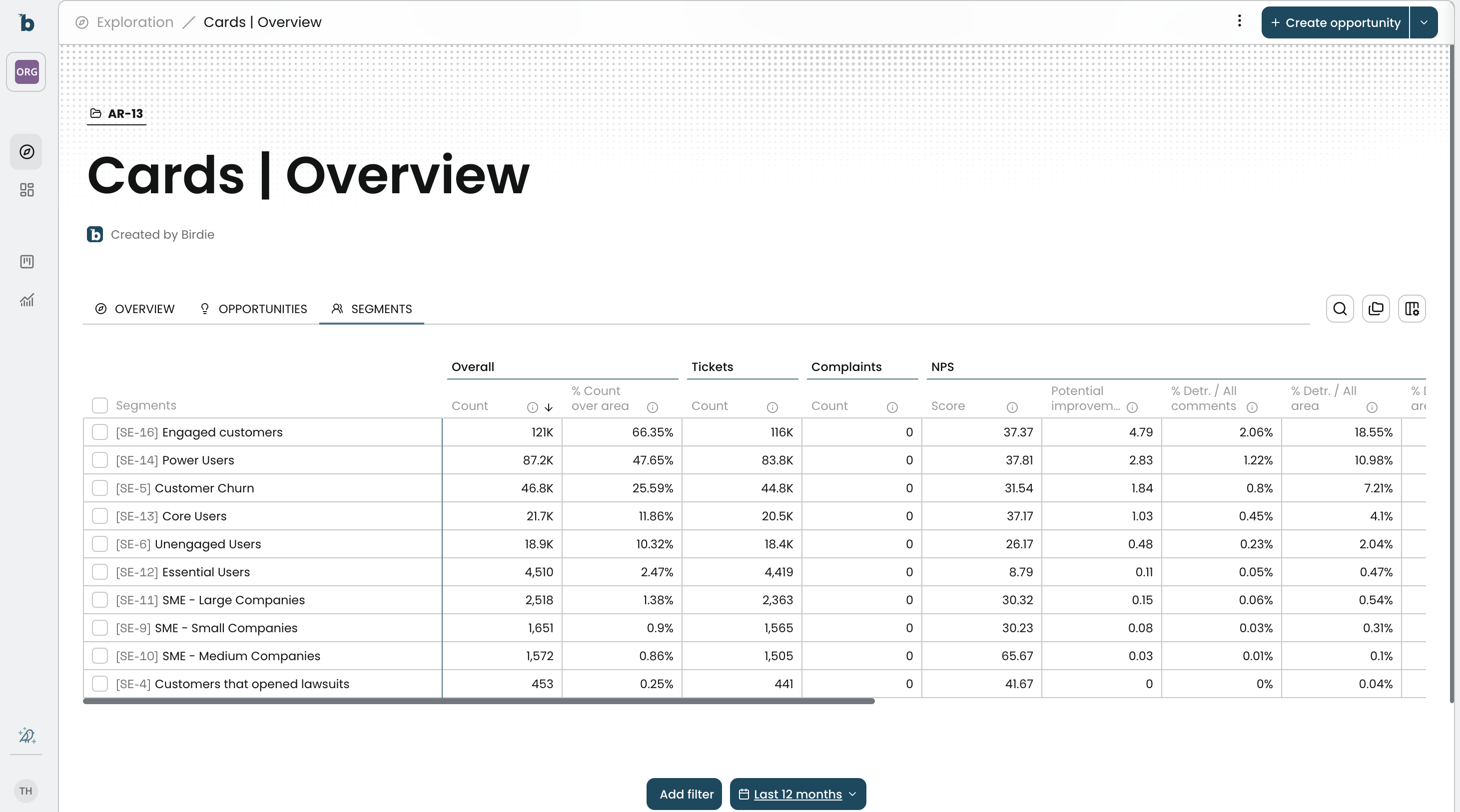
* Visualization of Segments in an Area
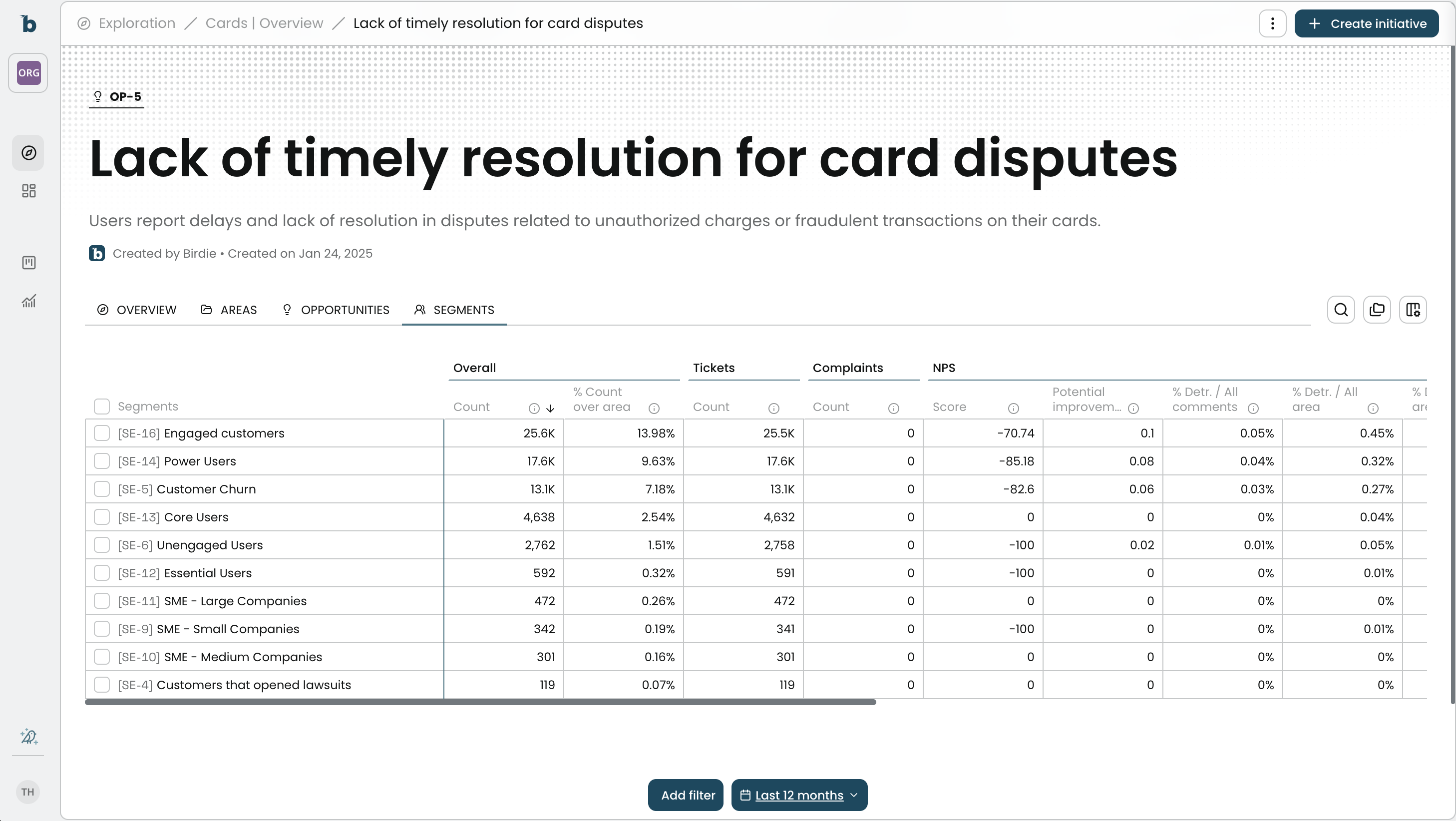
* Visualization of Segments in an Opportunity
## Use Case Examples
* CX Team: Identify that premium customers are reporting increased support wait times and prioritize solutions for this segment.
* Product Team: Discover that customers in a specific segment are experiencing issues with a newly launched feature, enabling targeted improvements.
* Marketing Team: Analyze feedback from a customer segment that participated in a recent campaign to measure impact and adjust future messaging.
## What Are the Requirements to Create a Segmentation?

To set up a new segmentation in Birdie, the following requirements must be met:
{% stepper %}
{% step %}
### Define the criteria
Determine the characteristics that define the segment (e.g., age range, geographic location, subscription type).
{% endstep %}
{% step %}
### Ensure the necessary data is available
Make sure the information needed to create the segment is centralized in Birdie. This can include:
* Imported profile data (Custom Fields).
* Integrations with other sources like CRM (e.g., Salesforce) or Product Analytics (e.g., Mixpanel).
{% endstep %}
{% step %}
### Access to the feature
Creating segments is available for users with administrative permissions. All users can access segments during their analysis.
{% endstep %}
{% step %}
### Apply the filters
After defining the criteria, apply these filters in the application. For detailed instructions on how to apply filters in Birdie, see the Filters Documentation:\
[Using filters in Birdie](/customer-intelligence/exploration-and-analysis/using-filters-in-birdie.md)
{% endstep %}
{% endstepper %}
{% hint style="info" %}
Creating segments requires admin permissions to set them up, but once created, all users can use them in their analysis.
{% endhint %}
Segmentation is an essential tool to enhance the accuracy and relevance of your analyses in Birdie. Explore it now and uncover new opportunities to transform your customer experience!
{% endtab %}
{% tab title="Organizing Segments with Collections" %}
## Why Segment Collections Matter
* Segments help you slice insights by different lenses: customer profiles, behavior, lifecycle status, etc.
* But not every segment type is directly comparable.
* Segment Collections keep these lenses organized, so you don’t compare unlike groups or lose track of valuable cuts.
## How Segment Collections Work
* Each Collection groups a family of segments.
* Users can:
* Compare segments within the same collection (e.g. churned vs. retained customers).
* Avoid mixing cross-domain comparisons that don’t make sense (e.g. Industry vs. Daily Active).
* Collections can be named intuitively (“CRM Status”, “Behavioral Cohorts”, “Firmographics”) so everyone navigates insights smoothly.
## Best Practices for Organizing Segments
* Create one collection per “dimension” of segmentation (Firmographics, Behaviors, Lifecycle).
* Agree internally on naming conventions (e.g. “DAU > 30” vs. “High DAU”).
* Use Collections as a training tool — new team members will quickly see “how we slice data here.”
* Review Collections quarterly: retire unused segments, align with evolving CRM or analytics sources.
## How to create a collection of Segments
* Navigate to your Segments tab in Exploration
* Select the Segment you want to group into a collection (e.g.: These 3 segments related to Customer Size)

* Click in Save Collection
* Give your Collection a name

* Change Segments table to group by collections

* Done!
* Now, get even more insightful analysis from your segmented data

{% endtab %}
{% endtabs %}
---
# Agent Instructions
This documentation is published with GitBook. GitBook is the documentation platform designed so that both humans and AI agents can read, navigate, and reason over technical content effectively. Learn more at gitbook.com.
## Querying This Documentation
If you need additional information that is not directly available in this page, you can query the documentation by asking a question.
Perform an HTTP GET request on the following URL with the `ask` and `goal` query parameters:
```
GET https://ask.birdie.ai/core-concepts-and-entities/segments.md?ask=&goal=
```
`ask` is the immediate question: it should be specific, self-contained, and written in natural language.
`goal` is what the user is ultimately trying to achieve, the reason they need the answer. Sharing it helps GitBook give you a better, more relevant answer. A goal is most helpful when it describes the outcome the user wants rather than restating the question. For example, with `ask=how do I create an API token`, a goal like `automate deployments from our CI pipeline` lets GitBook tailor the answer to that use case.
The response will contain a direct answer to the question and relevant excerpts and sources from the documentation.
Use this mechanism when the answer is not explicitly present in the current page, you need clarification or additional context, or you want to retrieve related documentation sections.